
Dealing with complexity: the Opus Project
Scoping, strategy, and stakeholder alignment on a system that grew bigger than anyone expected

The complexity monster can emerge from a simple framework. (AI image created by Microsoft CoPilot)
Project: Build a faculty information and review system Organization: UCLA | My Role: Lead UX Designer | Audience: Administration and faculty | Format: Web-based application
The assignment
The assignment looked simple: replace a paper-based faculty review system with a digital one, without changing any existing processes or policies. The original charge fit on a single page. But as any experienced UXer knows, what fits on a page rarely captures what hides beneath it.
The system had to be easier than the paper-based one that had been used for over twenty five years. If the system wasn't less time-consuming and easier to use, we hadn't done our job.
As application designers, we are often in the position where the client is not necessarily the user. Leadership had to be satisfied — but in the end, if the faculty refused to use the application nothing else really mattered. We knew that we had to strike the right balance of professional, intuitive, and above all, trustworthy.

Does it satisfy the cat? (Concept by John Boykin, YouTube video)
The client is not a cat. We are not a cat. We cannot compel the cat to do what we want. If the cat won’t eat the food, nothing else really matters! And in this case, cats meant faculty members.
Design Strategy
To begin, we agreed on a set of guiding principles that would shape every design decision.
Be on par with modern tools
There's no reason a university system can't be on par with the tools people use in their personal lives, like Uber and Amazon. No training required. Sophisticated yet easy. It doesn't have to look like a university system. That was actually a pretty radical idea at the time.
Have a holistic view
We wanted to always take a holistic view across the whole process, including other software and systems. One of the pain points of the old system was gathering information across many sources. So we always tried to show information that the user might need from other systems right in context.
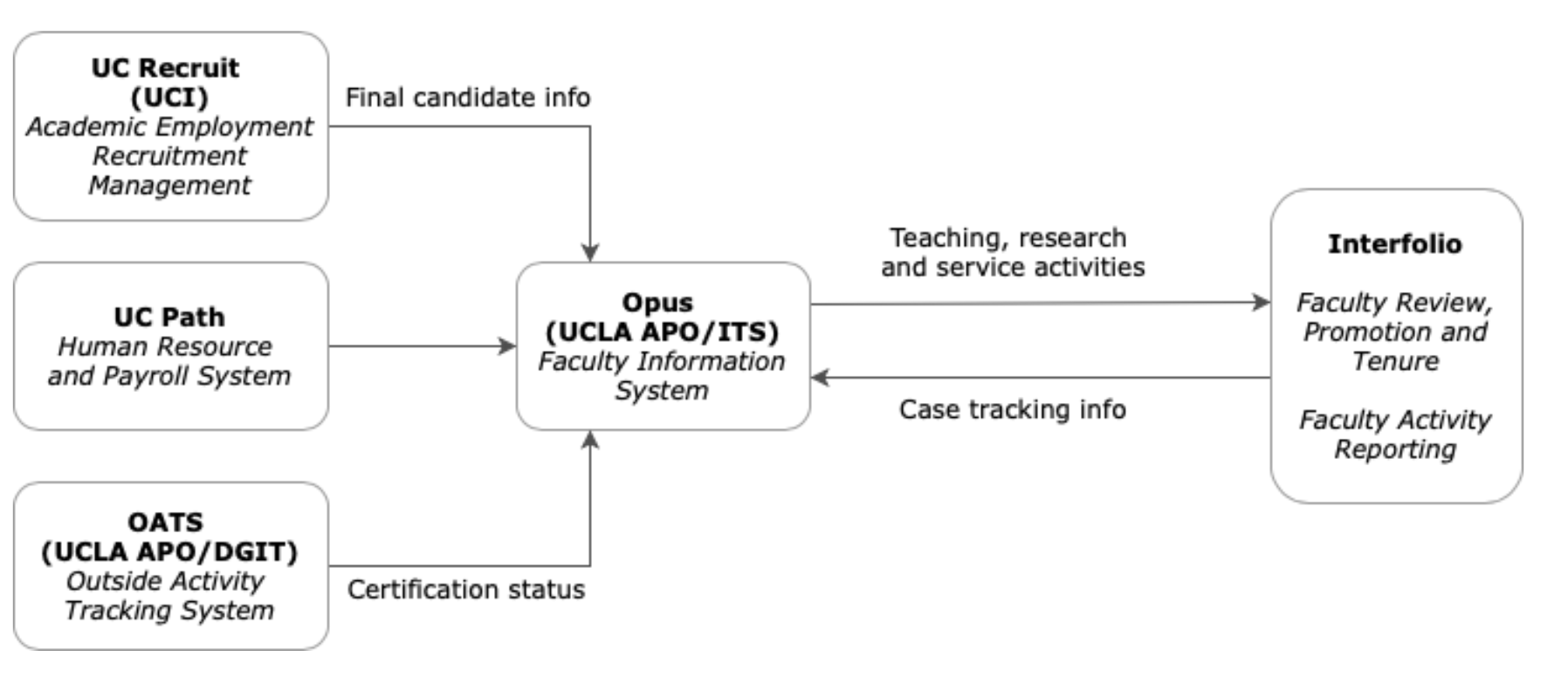
A diagram of how our system interacted with the other university systems.
Simplify the complex
The faculty review process is very complex. It references a lot of rules and policies, much like taxes! So TurboTax was our model. We wanted to take a complicated topic and ask a series of questions that makes it easy to navigate. You didn’t need to be an policy expert to use the system.
The complex was simplified using the TurboTax model: asking the user a series of questions and only displaying the relevant information.
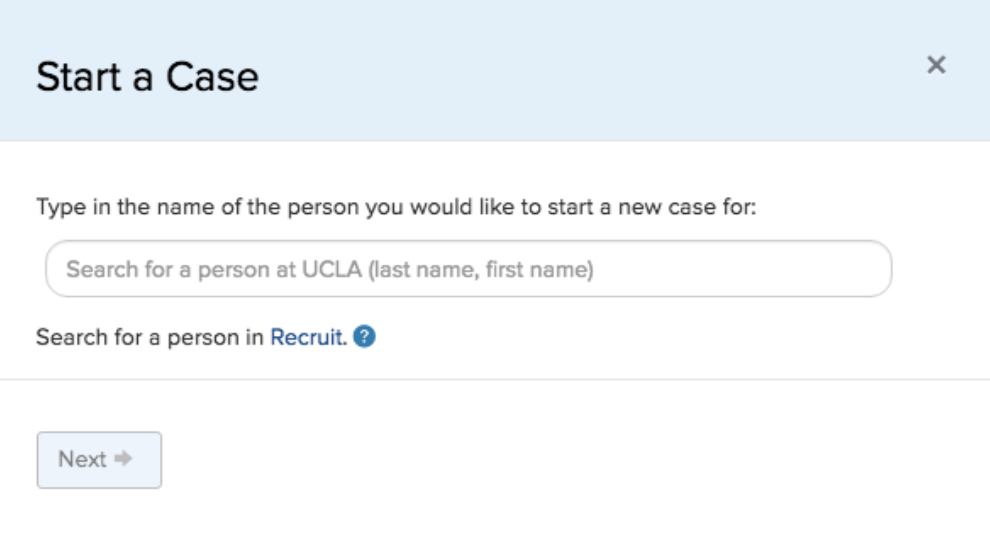
A modal that guides the user on the right path as they’re starting an academic review case.
Reduce human error
One particularly hard thing to figure out manually was eligibility for a promotion. It’s based on title code, years of service, time on the clock, and other variables. That's a perfect job for a computer, not a human. We built eligibility calculations in so that administrators got the right answer automatically instead of maintaining individual Excel sheets.
This report calculated things that computers should have been doing the whole time.
Don't fix what isn't broken
We interviewed the staff who managed the process. They had brilliant ways of organizing information, and we used the concepts from their existing spreadsheets directly in our page designs. Many of our tables used the same columns and mental models the staff already relied on.
The table design copied mental models from the users existing spreadsheets (names redacted)
Scoping the Problem
As we dug deeper, a kind of design quantum physics took over. The system changed every time we looked at it. Each layer revealed another beneath it. What started as a simple charge became a complex workflow spanning multiple user groups, committee structures, and institutional policies. We started behind the starting line.
To surface the full scope, we mapped the entire faculty review workflow as a task flow — accounting for every role, task, and handoff The resulting diagram was enormously long, which was information in itself.

A task flow diagram showing the academic review process
When we showed stakeholders this diagram, they understood the complexity immediately in a way that pages of documentation hadn't been able to. Seeing the full scope of what they'd been asking us to build made the conversation about tradeoffs much easier to have.
The Process
The design process moved through several stages:
Sketching
We did a lot of whiteboard sketching to work out some ideas for the navigation and page structure, particularly the sidebar for departmental administrators. Things changed rapidly as our understanding developed.
An early whiteboard sketch of the home page
UI pattern curation
The team used Pinterest to collect our favorite UI patterns. This allowed all of us to explore solutions together. Many of the interaction patterns we ended up using were found by the developers or other people on the team. We also wanted to identify the patterns that our users were already familiar with and take advantage of those. We weren’t building anything avant-garde, so It should be obvious how it worked.
Our Pinterest board
Card sorting
When wireframing exposed a sidebar problem (too much content, no clear hierarchy), we did physical card sorting. We wrote down everything someone would need to do, organized it into groups, named the groups, and prioritized. That became the foundation of our site structure.
Card sorting exercise
The site map developed out of the card sorting exercise
Prototyping and User Testing
We had two hypotheses for two different navigation approaches, so we built prototypes and tested them against each other.
We did five task-based sessions where we asked them to complete a task on the prototypes.
What the Testing Revealed
Neither sidebar we tested won. We ended up using a hybrid of what worked best from each — and discovered things we never would have guessed without testing.
In short, we had an entire section labeled wrong. Faculty didn’t consider sabbaticals and leaves to be “cases.” Eligibility was more important to users than we'd assumed, so we made it more prominent. We'd tried to copy Amazon's sidebar filter pattern, but when we asked users to filter by tenure faculty, four out of five people completely missed the filters. So we moved them to the top of the table. I wouldn't have predicted that, but the testing was clear.
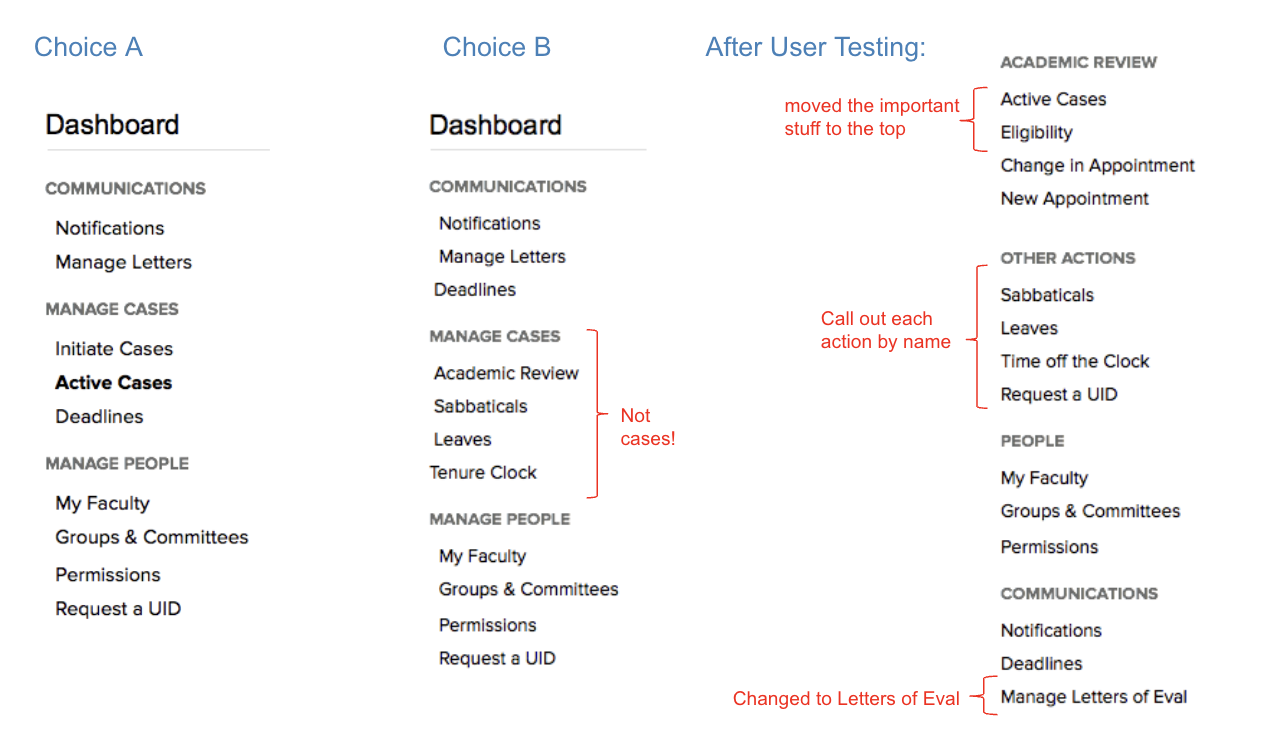
The two sidebar patterns we tested, and the one we ended up with after user testing.
Throughout the process we'd been showing imperfect work to stakeholders — road shows, town halls, meetings with departments and Deans. Showing an unfinished product early might seem like a risk, but it had the opposite effect. Inviting feedback early built trust. A lot of the anxiety about the new system turned into excitement as people saw how it was going to make their lives easier.
Measurable Goals
Strategy isn't useful unless you have measurable success criteria. Ours were:
Eliminate shadow systems: spreadsheets, binders, and parallel file systems. All information should live in the system.
Take less time to process: the new system should be faster than the paper process it replaced.
Accurate data: administrators should have access to correct, useful information at all times.
We checked these by going back to users and askingif they still maintained their own spreadsheets and whether the data in the system was correct.
Outcome — Including the Parts That Didn't Work
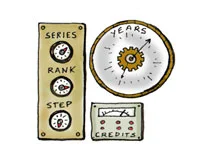
An eligibility calculator needed some tweaking after the first year
It wasn't perfect. We'd built too-strict business rules in some places. Data couldn’t be updated unless the promotion or merit case was approved and closed — and sometimes that didn’t happen. The result was that some of our data was incorrect, and some users kept their own spreadsheets anyway. We had failed to eliminate shadow systems, at least in the first year.
We went back and relaxed a lot of the business rules to account for the reality that processes don't always go as designed. We allowed administrators to directly edit their own data when it was wrong. We built more trust into the system, which led to the central office trusting the department offices more.
We also worked with the Academic Personnel Office to create an "At My Office" view that showed where cases were stuck and needed to be closed out — a way to identify and address bottlenecks in real time.
Six months later, the data was more accurate, and users had more trust in the system. To this day the team continues to iterate and make it better.
What I learned
Observation changes the system. The act of mapping requirements in detail revealed complexity that no one knew existed. Budgeting time for discovery always pays off.
Show, don't tell. A task flow diagram communicated the problem more effectively than pages of written requirements. Diagrams earn alignment faster than documents.
Scope cuts are design decisions, but so is admitting when your rules were too rigid. Knowing what to loosen is as important as knowing what to build. In our case, we built rules into the system that eventually caused problems for the users.
The instinct to simplify is right. But you have to earn simplicity by first understanding the full scope of the problem.
Artifacts
An early mental model of the different users and the tasks they needed to accomplish.
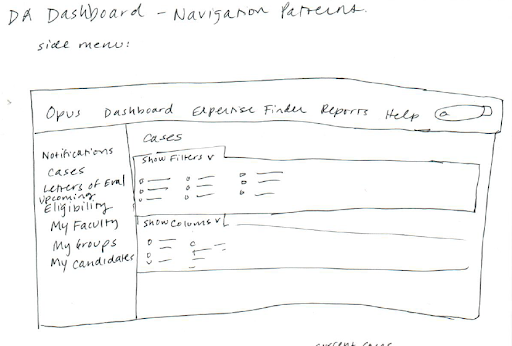
A sketch of the Cases page.
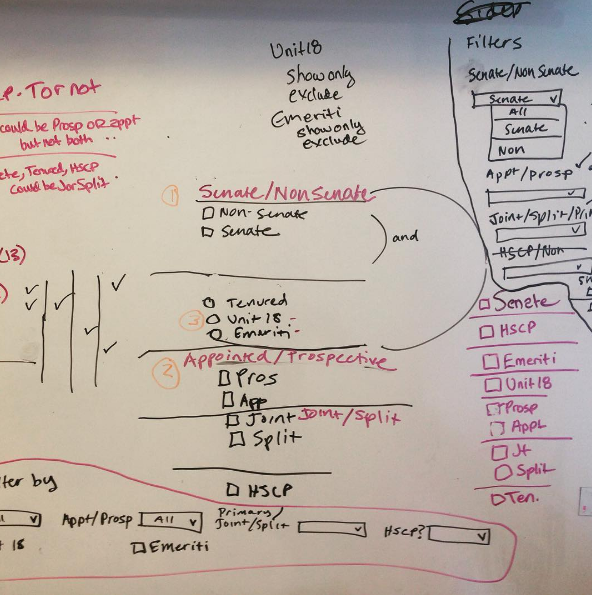
Trying to figure out the filters for the tables.
A flowchart describing the business logic of a form.
An early wireframe of the Cases page.
A screenshot of the actual page (names redacted)
We did a wireframe / task flow of a voting user interface that would mirror the current paper system. When we calculated the hours it would cost to build the voting user interface, our stakeholders agreed that this very simple voting tally would do.

The solution we arrived at.
Interactive prototypes helped the team and stakeholders intuitively understand the design.
The Opus logon screen captured our goal: to make the academic review process easier for everyone.